What Canonicalization Decides for Your Website

Your website probably has more addresses than pages. Filters, tracking links, and the www version of your address all point to the same content, and a search engine sees each address as a separate page. Canonicalization is how you tell it which address counts.
Why One Page Can Live at Many Addresses
A single page can appear at many addresses without anyone copying it on purpose. A category page changes when a visitor sorts or filters it. A site answers on both HTTP and HTTPS, or with and without www. A campaign link adds tracking parameters to a clean address. Each version looks like the same page to a reader, and each version is a separate URL to a search engine.
That is where canonicalization begins. Canonicalization is the process of selecting the representative URL of a piece of content, so search results show one version instead of every version. The word sounds technical, and the question behind it is simple. When several addresses hold the same content, which address should count as the real one?
How Search Engines Choose the Representative Page
Google groups pages with the same or very similar primary content together, then chooses the page that is objectively the most complete and useful for search users. That chosen page becomes the canonical page, and Google uses it as the main source to evaluate content and quality. The canonical page is also crawled most regularly, while duplicates are crawled less often, which reduces the crawling load on a site.
Your preference matters, and it is a hint, not a rule. Google may choose a different page as canonical than the one you prefer, for various reasons. Therefore, the job is to make your preference as clear as possible, and then to check what search engines actually chose, rather than assuming they agreed with you.
The Signals That Strengthen Your Preference
Three signals carry the most weight, and they work better together than alone. Google lists them in order of how strongly they can influence canonicalization.
- Redirects: A redirect is a strong signal that the target of the redirect should become canonical. Use a redirect when a duplicate address should no longer exist as its own page.
- Rel canonical link annotations: A rel canonical link is a strong signal that the specified URL should become canonical. Add the annotation to every duplicate page, and also add a self-referential canonical to the canonical page itself.
- Sitemap inclusion: Sitemap inclusion is a weak signal that helps the URLs included in a sitemap become canonical. It supports the stronger signals, and it does not replace them.
In addition to those three, keep the basics consistent. Serve the canonical page over HTTPS, link to the canonical address internally, and use the same address everywhere a link, a sitemap entry, or a canonical annotation points to that page.
What to Avoid When You Set a Canonical
A canonical annotation that points in two directions at once helps no one. Avoid these mistakes, each of which weakens or cancels your preference.
- Do not use robots.txt for canonicalization. Google may still index URLs that are disallowed in robots.txt, without their content.
- Do not use the URL removal tool for canonicalization. It hides all versions of a URL from Search.
- Do not specify different canonical URLs for the same page through different techniques, such as one URL in a sitemap and a different URL in a rel canonical annotation.
- Do not specify a URL fragment as canonical. Google generally does not support URL fragments for this purpose.
When a canonical annotation is ignored, the cause is often one of these conflicts, or a canonical address that returns an error, redirects elsewhere, or points to a page with different primary content. In other words, the annotation must match the page it claims to represent, and the page must be reachable.
What This Means for You
Canonicalization decides which address carries your content in search results, which address collects the links and signals for that content, and which address a reader reaches from a search result. A clear canonical preference gives search engines one address to trust, and it gives you one address to measure. A muddled preference splits that trust across several addresses, and the split shows up as confusing results, scattered signals, and performance that is hard to track.
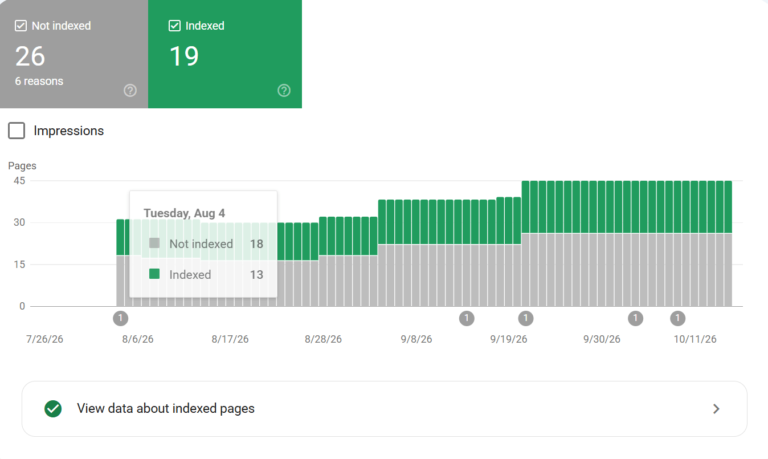
Start with the pages that matter most, and ask one question about each one. If this content appeared at five addresses tomorrow, which address would you want a searcher to reach? Answer that question in a redirect where a duplicate should disappear, in a rel canonical annotation where a duplicate must remain, and in your sitemap. Then check Search Console to confirm that search engines chose the address you intended, and fix the conflicts where they chose differently.
Sources
- Google Search Central, “What is URL Canonicalization”: https://developers.google.com/search/docs/crawling-indexing/canonicalization
- Google Search Central, “How to Specify a Canonical with rel=”canonical” and Other Methods”: https://developers.google.com/search/docs/crawling-indexing/consolidate-duplicate-urls